Working with the Movie Maker
With Dragonfly's Movie Maker, you can create animated sequences that include camera effects — such as zooms, pans, and rotations — and property transitions — such as window leveling, clipping, and opacity. Animated sequences may also contain any number of objects — such as image data, regions of interest, multi-ROIs, and meshes — and can be exported as video files or frame sequences.
You modify keyframes and preview animated sequences in 3D views, while the animation settings, playback controls, and editing options are available in the Movie Maker panel. Right-click inside a 3D view and then choose Show Movie Maker to open the Movie Maker panel.
Movie Maker panel and 3D view
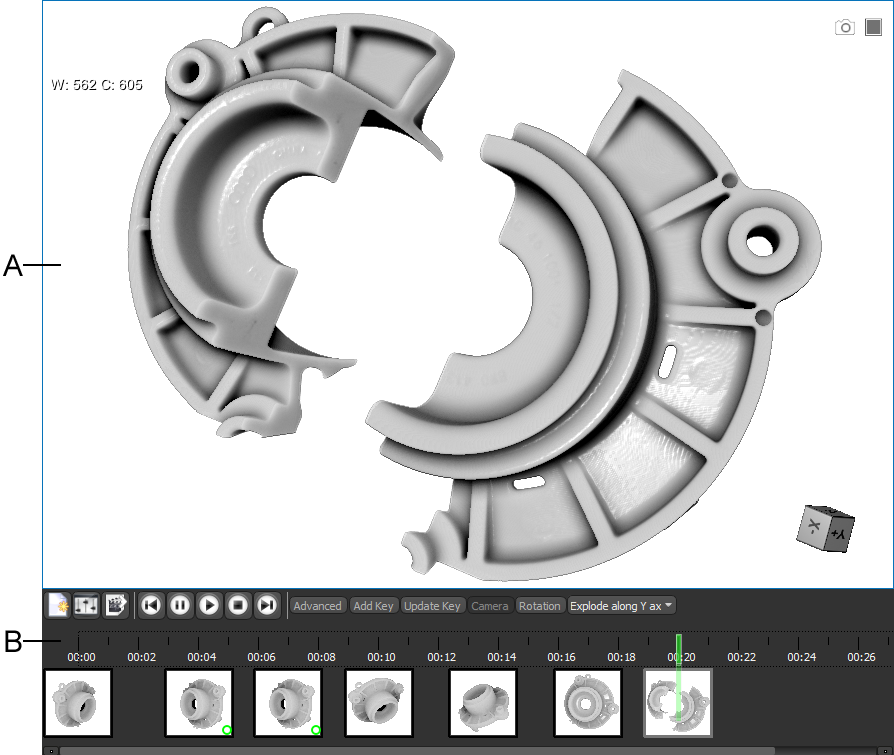
A. 3D view B. Movie Maker panel
 3D View
The 3D view, which provides the environment for modifying keyframes and viewing animated sequences, works in tandem with the timeline on the Movie Maker panel. Controls for modifying keyframes are available on the Tool panels (see Main Tab), while access to objects and object settings are available in the Data Properties and Settings panel (see Data Properties and Settings Panel).
Movie Maker Panel
Animation settings, playback controls, animation properties, as well as the timeline that shows the chronological arrangement of keyframes, are available in the Movie Maker panel (see Movie Maker Panel).
Planning Animated Sequences
Below are some tips for creating animated sequences that are informative and meaningful:
- Decide which views of the dataset or datasets you want to appear in your movie.
- Begin your image sequence with a familiar frame of reference for your audience. For example, if your audience can easily recognize a part of the model from a certain angle, you can start with the view at that angle and then rotate and zoom in as needed to focus on a region of interest.
- Plan the sequence of images to convey the story you want to tell.
- Avoid changing too much at once. Change the view over a series of keyframes, so that the audience can follow the sequence and think about what is shown.
- A number of preliminary steps may be required if your movie will contain specific features, such as regions of interest and meshes.
- Decide on the format for your movie — wide screen or standard — before you begin to produce and edit your animated sequence.